Local project dashboard and command-line tool
See which projects need your attention.
Local project dashboard and command-line tool
See which projects need your attention.
When your work spans several repositories, LocalHelm brings uncommitted work, releases, and dependency updates onto one board. Review a proposed action, then confirm it on the computer hosting your projects.
The operator board runs locally. The phone Deck is read-only. Dev-server controls require LocalSlip.
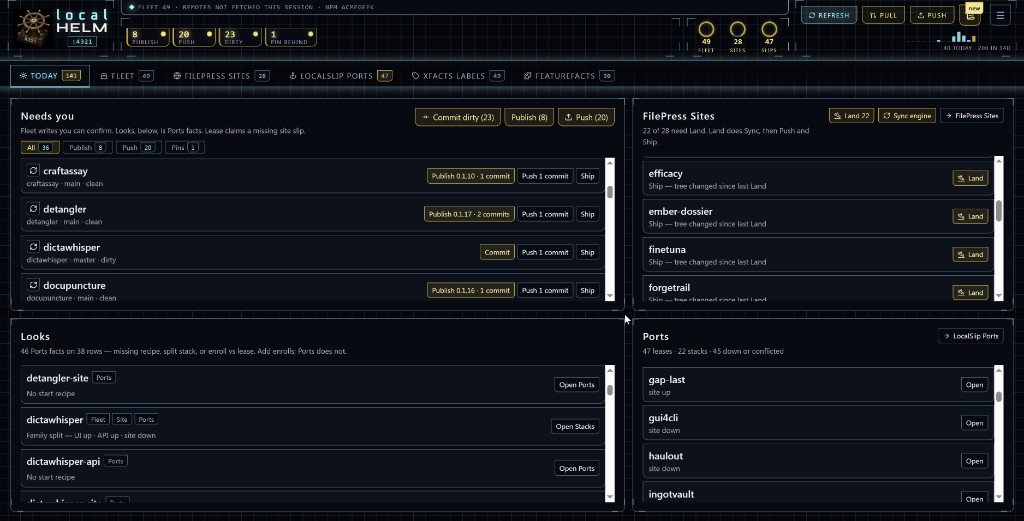
See what needs attention, then inspect the plan before confirming a write.
The controls depend on where you open it:
- Operator board,
http://127.0.0.1:4321on the machine that runslocalhelm serve: every read and every write. - Deck,
/deckfrom a phone or any other device on your LAN or Tailscale: read-only. It shows one tile per running app that has a LocalSlip claim and listens beyond127.0.0.1. Tap a tile to open that app. Long-press to copy its link. No commit, publish, start, or stop.
LocalHelm refuses write requests unless they come from loopback, so a phone cannot run them even with the right URL.
Run the operator board
Install, stand in the folder that contains your repos, then run:
localhelm serve
On the board, click Add projects, scan the folder, tick the repos you keep, and confirm. Nothing enrolls on its own.
The CLI runs the same actions. scan, status, and deps only read. Other commands print a plan, and --apply writes. publish, push, ship, and global need named ids. Never --force.
Start and stop need LocalSlip. The Sites tab needs a FilePress site. Both are optional; without them those tabs stay empty.
LocalSlip is the slip. LocalHelm is the wheel.
Docs · Install · Why a wheel